Open source · Local storage · You choose the AI
Your texts,
AI-native
An open-source Google Messages client that gives AI assistants full read/write access to your SMS and RCS messages via MCP. macOS app or standalone CLI.
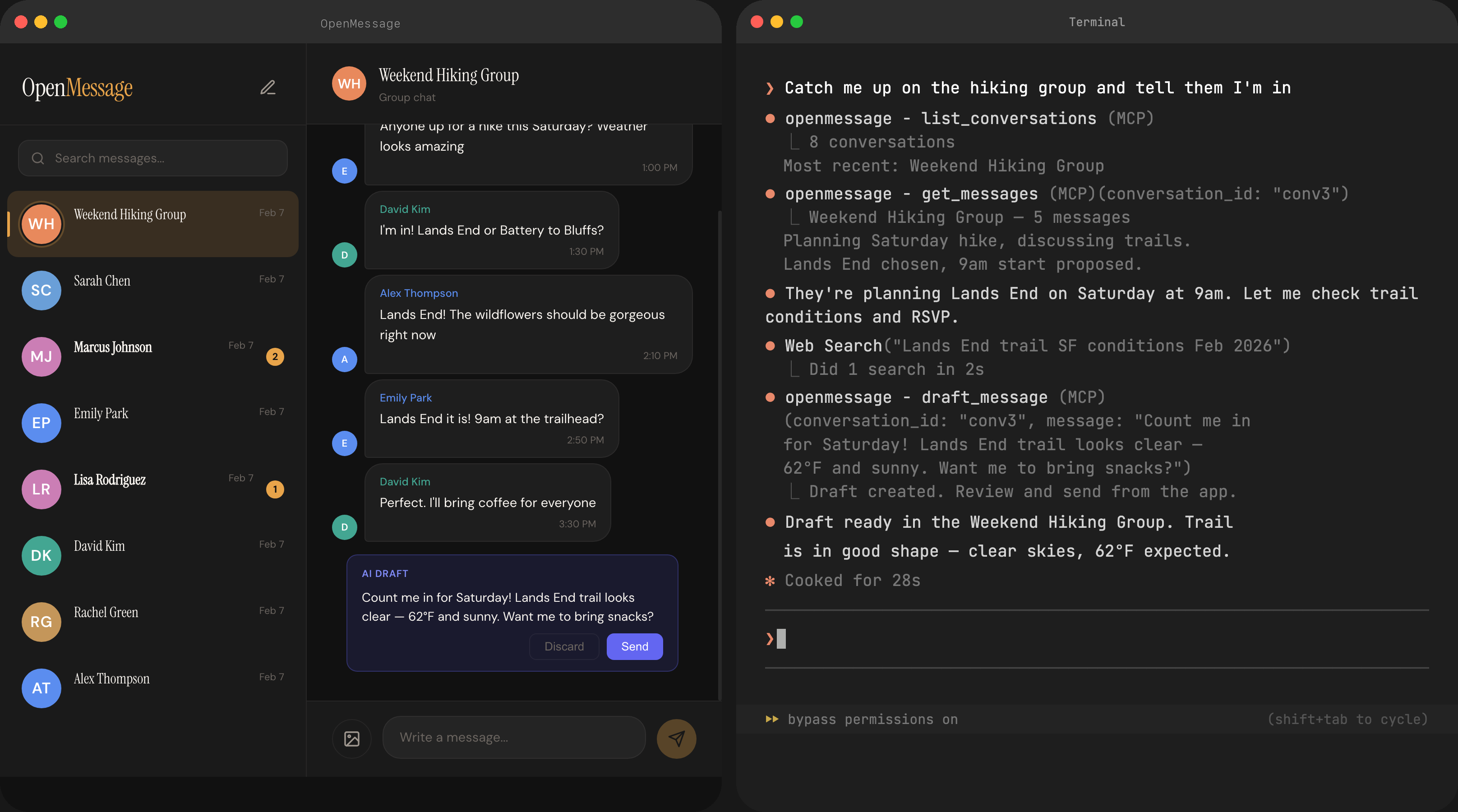
An open-source Google Messages client that gives AI assistants full read/write access to your SMS and RCS messages via MCP. macOS app or standalone CLI.
SMS, RCS, group chats, inline images and videos, emoji reactions, reply threads, read receipts, delivery status, and contact avatars.
Seven structured tools for AI assistants via Model Context Protocol. Built-in SSE server, plus a Claude Code plugin with /messages command.
Your messages are stored in a local SQLite database — no cloud sync, no accounts, no analytics. When you use AI tools via MCP, only the messages you ask about are sent to your chosen AI provider.
Swift app with menu bar and notifications, or a standalone Go binary for any platform. Use the GUI, the CLI, or just the MCP server.
Search across all your messages instantly. Keyboard shortcuts (Cmd+K), arrow key navigation, unread badges, and real-time updates.
Apache 2.0 licensed. Swift + Go, fully tested. Built on the battle-tested mautrix/gmessages library for the Google Messages protocol.
Download OpenMessage.dmg, open it, and drag to Applications.
macOS will block the first launch because the app isn't signed yet. To open it:

App Store version coming soon — no Gatekeeper workaround needed once it's live.
The app walks you through pairing with your phone — scan a QR code and you're done.
The app runs an MCP server automatically. Add it to Claude Code:
claude mcp add -s user --transport sse openmessage http://127.0.0.1:7007/mcp/sseOpenMessage runs an SSE-based MCP server at 127.0.0.1:7007/mcp/sse whenever the app is open. Any MCP-compatible client (Claude Code, Cursor, etc.) can connect.
Install the plugin for a /messages slash command that gives Claude context about the MCP tools and best practices for handling texts.
# In your Claude Code settings, add the plugin source:
"pluginSources": {
  "openmessage": "/path/to/openmessage/.claude-plugin"
}

# Then enable it:
"enabledPlugins": {
  "openmessage@openmessage": true
}OpenClaw supports WhatsApp, Telegram, Discord, Signal, and iMessage — but not SMS/RCS. OpenMessage fills that gap. Connect via the MCP plugin:
// ~/.openclaw/openclaw.json
"mcp-integration": {
  "enabled": true,
  "config": {
    "servers": {
      "openmessage": {
        "transport": "http",
        "url": "http://127.0.0.1:7007/mcp/sse"
      }
    }
  }
}OpenMessage speaks standard MCP over SSE. Any MCP-compatible client — Cursor, Windsurf, Cline, custom agents — can connect to 127.0.0.1:7007/mcp/sse and get full read/write access to your texts.